your own dcim, generated
alembic’s django adapter turns your data model into a small dcim of
your owncargo install alembic-cli
most alembic adapters converge a system that already exists: netbox, nautobot, infrahub, a rest api. the django adapter is different. it doesn’t manage a system, it emits one. you give it your data model and your objects, and it generates a runnable django app with models, an admin, and a rest api, with your inventory already loaded.
this post is about what that app is good for, and why i think it was the most important adapter alembic had early on. it also goes into the history of alembic, so if that’s interesting to you, read on!
a model of your own
alembic starts from a model you define. here’s a small one: sites, devices with a role, interfaces, and prefixes. let me show you the types and omit the concrete objects (they’re a bit noisy):
schema:
  types:
    dcim.site:
      key: {slug: {type: slug}}
      fields:
        name: {type: string}
        slug: {type: slug}
    dcim.device:
      key: {name: {type: slug}}
      fields:
        name: {type: slug}
        site: {type: ref, target: dcim.site}
        role: {type: enum, values: [spine, leaf]}
    dcim.interface:
      key: {device: {type: ref, target: dcim.device}, name: {type: string}}
      fields:
        device: {type: ref, target: dcim.device}
        name: {type: string}
        mac: {type: mac}
    ipam.prefix:
      key: {prefix: {type: cidr}}
      fields:
        prefix: {type: cidr}
        site: {type: ref, target: dcim.site}
point alembic at a django backend config, plan, and apply:
backend: django
output: ./dcim
project: dcim_project
app: dcim_app
$ alembic plan --backend-config django.yaml -f fabric.yaml -o plan.json
plan: 5 to create, 0 to update, 0 to delete
create:
dcim.device {"name":"leaf01"}
dcim.device {"name":"spine01"}
dcim.interface {"device":"33333333-3333-3333-3333-333333333333","name":"eth1"}
dcim.site {"slug":"fra1"}
ipam.prefix {"prefix":"10.0.0.0/24"}
plan (json) written to plan.json
$ alembic apply --backend-config django.yaml -p plan.json
applied 5 operationsapply has written the app, run the migrations and loaded the objects
as a fixture. python manage.py runserver and it’s
serving.
what you get
every type becomes a model. a ref becomes a foreign key,
an enum becomes choices, a mac or
cidr gets a validator, and the key becomes a unique
constraint. let’s look at the device model as an example:
class DcimDevice(models.Model):
    uid = models.UUIDField(primary_key=True, default=uuid.uuid4, editable=False)
    key = models.TextField()
    attrs = models.JSONField(default=dict, blank=True)
    name = models.SlugField()
    role = models.CharField(
        max_length=255,
        choices=[("spine", "spine"), ("leaf", "leaf")],
        blank=True)
    site = models.ForeignKey(
        "DcimSite",
        on_delete=models.PROTECT,
        related_name="dcimdevice_site",
        blank=True,
        null=True)
on top of that sits a django rest framework api with filtering,
search and pagination, and an openapi schema at
/api/schema/ if drf-spectacular is installed.
we generate it from the model, constraints and all:
$ curl -s 'localhost:8000/api/dcimdevices/?role=leaf'
{"count":1,"next":null,"previous":null,"results":[{"uid":"33333333-3333-3333-3333-333333333333", ... "name":"leaf01","role":"leaf","site":"11111111-1111-1111-1111-111111111111"}]}
$ curl -s -X POST -H 'content-type: application/json' \
    -d '{"key":"spine02","name":"spine02","role":"border"}' \
    localhost:8000/api/dcimdevices/
{"role":["\"border\" is not a valid choice."]}
at its core, it’s a simple code generator. the app is generated from your spec, warts and all.
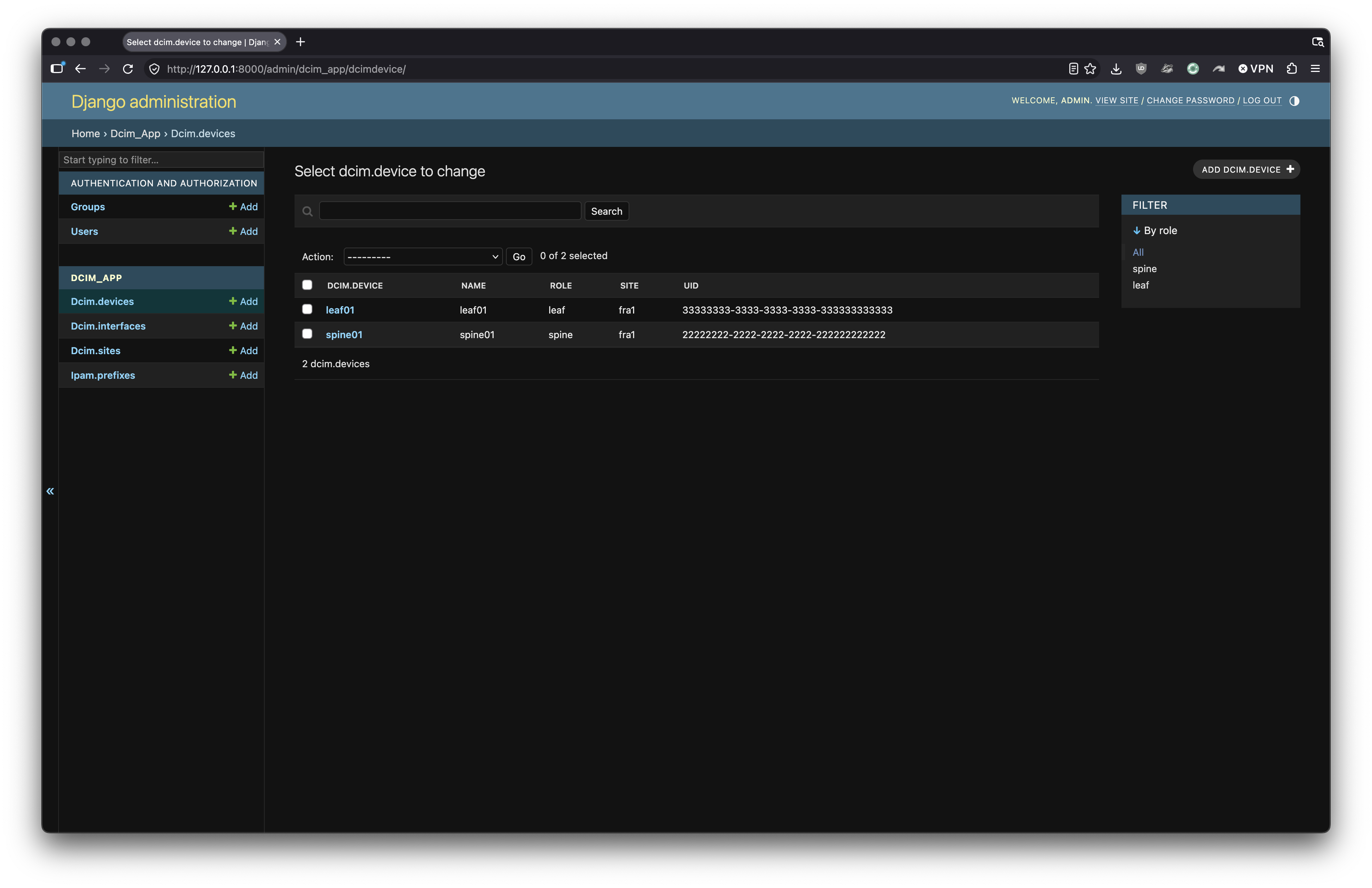
of course the models are wired up for the admin dashboard, should you need it.
what it’s for
i see two uses.
the first is a seed. if you want your own production dcim, one that
fits how your network actually works rather than how a product thinks it
should, this gives you a working start. only the
generated_*.py files and the fixture are rewritten on each
run, everything else in the app is yours to change. it is a scaffold,
though, and reconciling later schema changes with migrations you’ve
already applied is up to you. you might also just use it as a poc or
test bed to see what running your own dcim would entail.
the second is a small api-centric source of truth. not everyone needs netbox. sometimes you want a place that holds the entities your automation cares about, with an api your scripts can query and validation that matches your model, and nothing else. maybe you have many systems that want to create entities, like ticket systems or customer self care portals, and you just need one central aggregated sink for all of that.
some history
the django adapter is older than alembic itself. the whole thing started last year as a small notebook in glamorous toolkit that parsed a yaml ir and generated a django app from it. i built it because marcus stögbauer, the guy behind the idea of data-model-centric network automation, described the idea to me and i needed to work through it with my fingers. he’s the conceptual mastermind, i need to code monkey through it to get it.
the rust version came in alembic’s first week as a github project. it mattered more to me than it probably deserved, because it was the first test of the actual claim of “a model of your own”.
let me explain.
converging netbox shows that alembic knows netbox. generating a stand-alone system from your model shows that the model is at the center. you describe your data once, and the same description becomes the database schema, the api contract and the validation, and it’s also what drives the other backends, dcim, automation, the whole thing. the model truly is what ties it all together, it becomes something you build on.
a lot of what came later, map, external adapters, the
emitters in alembic ops, follows from that idea. i think the django
adapter is still the clearest way to test our claims.
fin
the django app was a proof of concept, but it survives to this day, and i think of it rather fondly.
if you want to play with it, the cli can be installed with
cargo install alembic-cli or downloaded from the releases
page. the generated app needs django and django rest framework,
django-filter and drf-spectacular are
optional. if you want to grow one of these into something real, get in touch.